The Mullions tool divides a window or curtain wall drawn with the Windows tool into equal segments. The division points mark the façade mullions, which are the reference points for placing new partition walls. This tool is optional.
How to divide a window with mullions
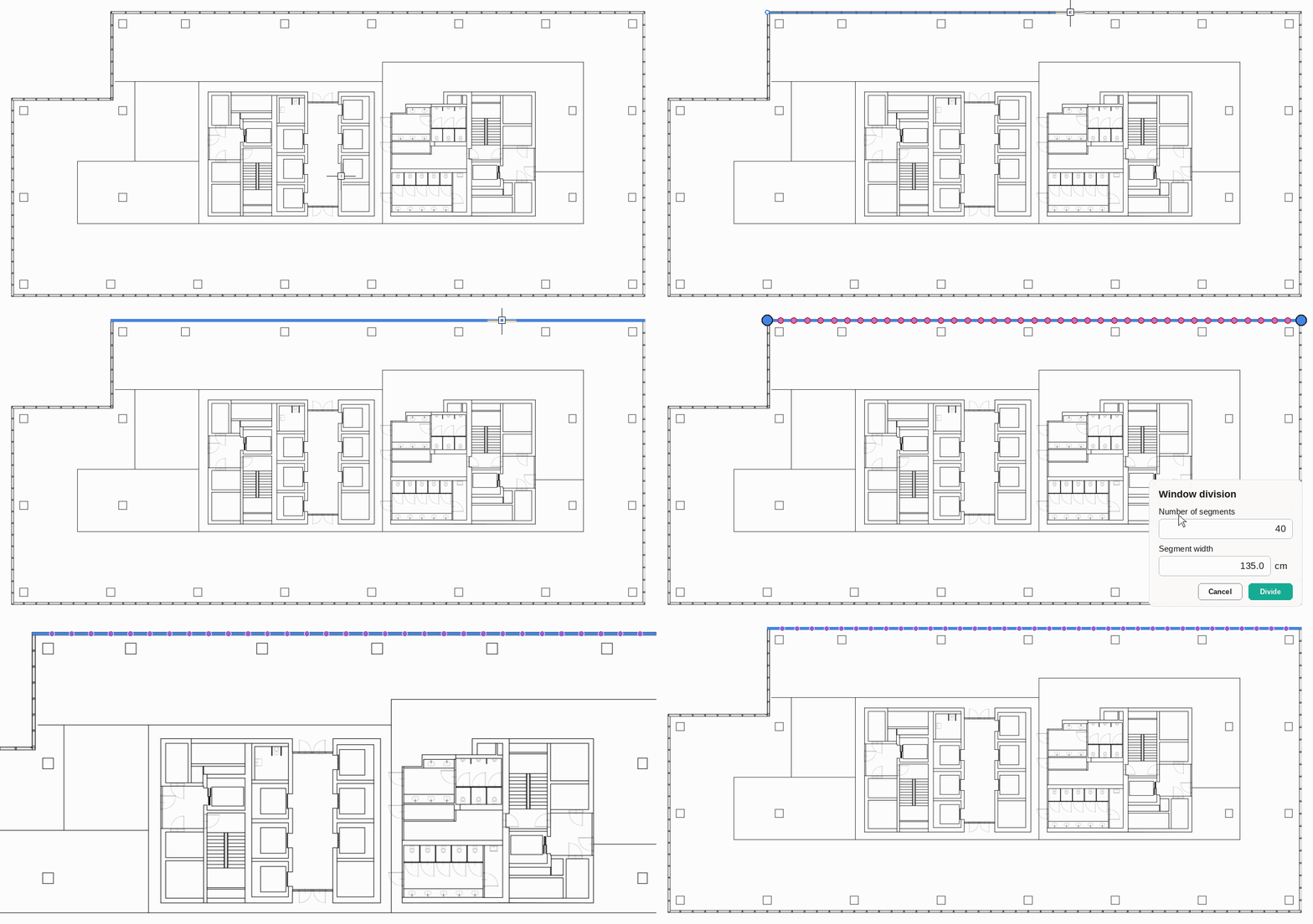
- Draw the window along the façade with the Windows tool (shortcut W), from corner to corner, and press Esc to finish.
- Select the Mullions tool (shortcut M).
- Click the window segment you want to divide. Its endpoints are highlighted.
- In the Window division panel, enter the Number of segments. The Segment width is calculated automatically, and the division points are previewed on the segment.
- Click Divide.
Rules
- The division points must coincide with the façade mullions on the underlay. Check the mullion spacing on the underlay and choose the number of segments so that the segment width matches it. For example, a 54 m façade with mullions every 150 cm needs 36 segments.
- If the preview points do not line up with the mullions, change the number of segments before you click Divide.
- Repeat the division for each window segment that has mullions.
Czy ten artykuł był pomocny?
To wspaniale!
Dziękujemy za opinię
Przepraszamy, że nie udało nam się pomóc!
Dziękujemy za opinię
Wysłano opinię
Doceniamy Twój wysiłek i postaramy się naprawić artykuł